
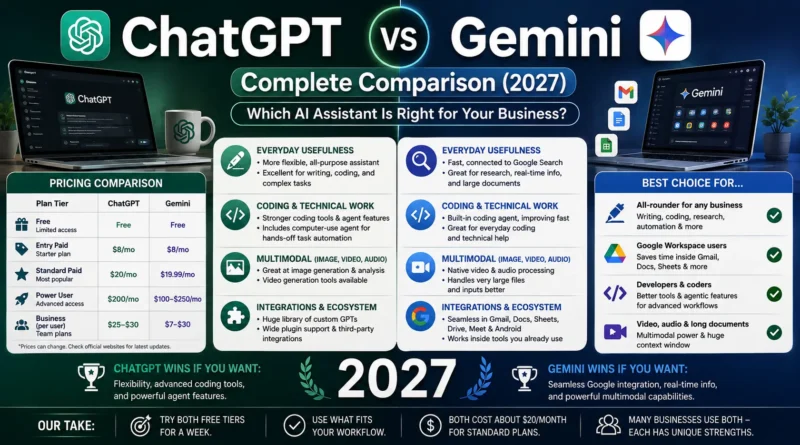
ChatGPT vs Gemini: Complete Comparison (2027)
If you’ve narrowed your search down to two names, they’re almost always these: ChatGPT and Gemini. Both are excellent, both cost about the same, and both will happily draft your emails, summarize your meetings, and help you think through a decision at 2 a.m. So why does picking one still feel harder than it should?
Because the marketing pages don’t tell you the thing that actually matters: which one fits how you already work. This guide skips the spec-sheet noise and gets into the practical differences — pricing, everyday usefulness, integrations, and where each one quietly falls short — so you can make the call in five minutes instead of an afternoon.
(If you haven’t seen it yet, we cover the full list of tools worth pairing with either one in our guide to the best AI tools for small businesses.)
The Short Answer
If you want one sentence: ChatGPT is the more flexible, all-purpose assistant with the deeper toolset for writing, coding, and agent-style tasks. Gemini is the better pick if your work already lives inside Gmail, Docs, Sheets, and the rest of Google Workspace.
Everything below explains why — and where that general rule breaks down.
Pricing: About as Close as It Gets
This is the part people expect to be complicated, and honestly, it isn’t anymore. Both platforms have converged on nearly identical pricing at every tier.
| Plan Tier | ChatGPT | Gemini |
|---|---|---|
| Free | Limited access to a lighter model | Limited access to a lighter model |
| Entry paid | ChatGPT Go — around $8/month | Google AI Plus — around $8/month |
| Standard paid | ChatGPT Plus — $20/month | Google AI Pro — $19.99/month |
| Power user | ChatGPT Pro — $200/month | Google AI Ultra — around $100–250/month |
| Business (per user) | ChatGPT Business — ~$25–30/user/month | Gemini via Google Workspace — from ~$7–30/user/month depending on plan |
Pricing shifts often for both companies — always check current pages before budgeting.
The one meaningful difference: Gemini’s business pricing can be noticeably cheaper if you’re already paying for Google Workspace, since Gemini access is often bundled into plans you’re likely already buying. ChatGPT Business is a separate line item on top of whatever else you’re paying for.
Bottom line on price: for solo users, it’s basically a coin flip. For teams already on Google Workspace, Gemini often wins on total cost.
Everyday Usefulness: Writing, Research, and Getting Things Done
For most small business owners, the day-to-day test isn’t a benchmark score — it’s “can this thing draft a decent client email without me rewriting half of it.”
ChatGPT tends to produce more polished, nuanced prose out of the box and is generally considered stronger at following detailed, multi-step instructions without losing the thread. It also holds onto context about you across sessions better — remembering your preferences and past projects without you re-explaining them every time, which matters if you use it daily for the same kinds of tasks.
Gemini is fast, capable for everyday writing and research, and has a real edge when your question benefits from live web context, since it’s tightly wired into Google Search. It also tends to be quicker to respond, which is a small but real quality-of-life difference when you’re firing off a dozen quick questions in a row.
For research specifically, Gemini’s native connection to Search and its ability to process very large amounts of text at once (huge context windows) makes it a strong choice when you’re feeding it long documents or need it to pull in current information.
Coding and Technical Work
If your business involves any amount of coding — even just a solo founder building a simple site or automating a spreadsheet — this is where the two diverge more.
ChatGPT currently has a broader, more mature toolkit for developers: cleaner code generation across common languages, a dedicated coding agent, and — notably — a “computer use” style agent mode that can operate a desktop directly, clicking through software and completing multi-step tasks without step-by-step hand-holding. Gemini has its own coding agent and is improving quickly, but as of now it doesn’t fully match ChatGPT’s agentic depth for hands-off task completion.
If coding or task automation is central to your business, ChatGPT is the safer default. If code only shows up occasionally, either will get you through it fine.
Multimodal Work: Images, Video, and Audio
This is one of Gemini’s clearest strengths. Google built Gemini around multimodal understanding from the ground up, and it shows — Gemini handles video and audio processing natively, in ways ChatGPT doesn’t match as directly. If your business involves reviewing video content, transcribing and analyzing audio, or working across mixed media regularly, Gemini has a real structural advantage here.
ChatGPT still covers image generation and analysis well and has its own video generation tools, but Gemini’s native multimodal handling is generally considered the stronger, more integrated experience.
Integrations and Ecosystem
This might be the single biggest deciding factor for a small business, and it has nothing to do with model quality.
Gemini lives inside tools you’re probably already using — Gmail, Docs, Sheets, Drive, Meet, and Android. If your business runs on Google Workspace, Gemini shows up in the work itself rather than as a separate destination you have to remember to visit. That friction reduction is worth more in practice than most benchmark differences.
ChatGPT’s ecosystem is broader in a different way — a large marketplace of custom GPTs, wide third-party plugin support, and integrations across many tools outside any single company’s walled garden. If your business doesn’t run primarily on Google products, ChatGPT’s flexibility outside any one ecosystem is the more useful trait.
Simple rule: if switching away from your inbox to use an AI tool feels like friction, Gemini removes that friction for Google users. If you’re not deep in the Google ecosystem, that advantage disappears.
Where Claude Fits Into This Conversation
Since it comes up constantly in the same breath: Claude, made by Anthropic, is the third major option and worth a mention here even though this guide focuses on ChatGPT and Gemini. Claude has built a strong reputation specifically around long-document accuracy and careful, polished writing — genuinely useful for businesses that live in contracts, reports, or detailed client-facing documents. It’s priced almost identically to the other two at the entry paid tier.
A common pattern among small businesses in 2026 isn’t picking just one — it’s ChatGPT or Gemini as the daily driver, with Claude brought in specifically for document-heavy work where wording precision really matters. We cover this three-way decision in more depth in our full AI tools roundup.
Which One Should You Actually Pick?
Here’s the practical decision tree:
- You’re already paying for Google Workspace → Start with Gemini. The integration savings alone often justify it.
- You want one flexible assistant for a broad mix of tasks → Start with ChatGPT. It remains the safer general-purpose default.
- Coding or task automation is core to your business → ChatGPT, for now — its agent tooling is more mature.
- You regularly work with video, audio, or need very long documents processed at once → Gemini’s multimodal handling and context window give it the edge.
- You’re not sure and don’t want to overthink it → Try the free tier of both for a week doing your actual daily tasks, not test questions. The answer usually becomes obvious fast.
Plenty of small businesses land on running both — ChatGPT for general work and coding, Gemini inside their Google Workspace flow — since the combined cost is still modest at around $40/month. Start with one, though. Add the second only once you’ve hit a clear, specific gap.
Common Questions
Is ChatGPT or Gemini better for small business owners specifically?
Neither wins outright — it depends on your existing tools. If you’re a Google Workspace shop, Gemini’s integration usually pays for itself. Otherwise, ChatGPT’s flexibility makes it the more forgiving default.
Which is cheaper?
They’re nearly identical at the standard $20/month tier. Gemini can come out cheaper for teams already on a Google Workspace business plan, since access is often bundled in.
Can I use both?
Yes, and a fair number of small businesses do — ChatGPT as the general assistant, Gemini for anything living inside Google Docs, Sheets, or Gmail.
Do I need the expensive top-tier plan?
Almost never, for a small business. The $20/month standard tier on either platform comfortably covers day-to-day drafting, research, and analysis. Save the $100–250/month tiers for teams with genuinely heavy, constant usage.
How does Claude compare to both of these?
Claude trades some of the broad flexibility of ChatGPT and the ecosystem integration of Gemini for stronger performance on long, detail-sensitive documents. It’s less of a head-to-head competitor and more of a specialist worth adding for document-heavy work.
Final Verdict
There’s no universally “better” tool here — just a better fit for how you already work. Gemini rewards businesses that live inside Google’s ecosystem with real, everyday time savings. ChatGPT rewards businesses that want one flexible assistant capable of stretching across writing, coding, and increasingly hands-off task automation.
The good news: at roughly $20 a month, testing both for a couple of weeks costs you less than a single client lunch. Pick the one that disappears into your workflow instead of interrupting it — that’s the real signal, more than any benchmark.
Curious where these fit alongside the rest of your toolkit? Read more in our full guide to the best AI tools for small businesses — it covers the marketing, support, and automation tools worth pairing with whichever assistant you pick.